Task Description: Our theme for the term is musical madness. So for our animation we had to create a animation on a nursery rhyme. We had three options to choose from and after we've chosen our nursery rhyme we had to animate it. The three options were Incy Wincy spider, Tirama Tirama and O le pepe. I chose Incyy Wincy Spider and here is my finished project. Hope You Enjoy!
Showing posts with label Mr Goodwin. Show all posts
Showing posts with label Mr Goodwin. Show all posts
Friday, 1 December 2017

Friday, 20 October 2017
Holiday Blogging Award!
Kia Ora Blog Viewers! This is a late update but I'm just gonna tell you anyways! Yesterday in our Team 4 assembly we were handing out holiday blogging awards. If you visited my blog in the holidays you would've seen blog-posts of me participating in the Team 4 Holiday Blogging Challenge. It was a great blogging challenge I got to create my own shoes, do origami and even clean the house! Back to the awards! We had a special person hand our little bags and it was Mrs Burt! Mrs Burt is like the mother of the school blogging challenge, so one of our teachers hooked her up to come and hand out the prizes. Prizes were given for: The Most Posts, Audience Appeal, Entertaining the Burt's (Mr and Mrs Burt), Quality of Posts and last but not least for going the extra mile. I was given my prize for the Quality of my Posts. I stood up proudly as my friends cheered me on!Overall it was a great morning we even took a photo with the beautiful Mrs Burt. STAY TUNED 4 MORE BLOG POSTS GUYS!!!!!!!! BTW: THANK YOU MR GOODWIN FOR THE CHALLENGE!
Thursday, 12 October 2017
Holiday Blogging - Making my own Beat (Task 8)
Walt: Share our creations.

Today task is all about creating our own beat! I created my own beat. If you would like to hear the beat just click the image above this writing! I have created a beat using a site called incredibox.com. It is an amazing site that helps you create your beat. It's kinda like acapella. I have created cool beat using beats, effects melodies and voices. I chose this beat because it has pretty simple. My brother also enjoyed the beat and was amazed. Remember to stay tuned for more blog-posts!
Listen to my beat here!
Today task is all about creating our own beat! I created my own beat. If you would like to hear the beat just click the image above this writing! I have created a beat using a site called incredibox.com. It is an amazing site that helps you create your beat. It's kinda like acapella. I have created cool beat using beats, effects melodies and voices. I chose this beat because it has pretty simple. My brother also enjoyed the beat and was amazed. Remember to stay tuned for more blog-posts!
Holiday Blogging - How To Make Your Own Shoes! (Extra Task)
Walt: Provide step by step information.
Task Description: For this Extra Task we had to make a presentation on How To Make Your Own Shoes! Just simply follow the steps that I have written down. I am not quite sure what the name of the site was where I created my shoes but I think it was the The Nike Shop. I hope the steps inside the presentation is good! I really enjoyed designing these shoes and that's why I made this presentation so you can try it! Comment down below if you enjoyed it or not. Until then Goodbye!
Task Description: For this Extra Task we had to make a presentation on How To Make Your Own Shoes! Just simply follow the steps that I have written down. I am not quite sure what the name of the site was where I created my shoes but I think it was the The Nike Shop. I hope the steps inside the presentation is good! I really enjoyed designing these shoes and that's why I made this presentation so you can try it! Comment down below if you enjoyed it or not. Until then Goodbye!
Tuesday, 10 October 2017
Holiday Blogging - Making my own Shoe! (Task 7)
Walt: Design Shoes.
Task Description: Today's task we got to create out own shoes! We created this using a site I don't know what it's called but you got to try it out! Here's the link. I created my own shoe and it costs 100 dollars! I know right. I really want to buy them but I gotta have to save up money and ask my parents. It was fun creating my shoes. This presentation above shows my shoes in different angles. I thought that the design that I made was pretty cool. I loved the options on the site. This was a fun task!
Task Description: Today's task we got to create out own shoes! We created this using a site I don't know what it's called but you got to try it out! Here's the link. I created my own shoe and it costs 100 dollars! I know right. I really want to buy them but I gotta have to save up money and ask my parents. It was fun creating my shoes. This presentation above shows my shoes in different angles. I thought that the design that I made was pretty cool. I loved the options on the site. This was a fun task!
Holiday Blogging - Flying Paper Planes! (Extra Task)
For the Team 4 Holiday Blogging Challenge yesterday's task was all about Paper Planes! For the Extra task we had to Have a competition with our family playing with the paper planes we have already made and blog about the results! So I decided to grab my brother we can play. These three video's below shows how me and my brother fly the planes! It was pretty fun. Hope you enjoy!
Holiday Blogging - How to make your own Logo! (Extra Task)
Walt: Provide instructions on how to make your own logo.
Task Description: For today's Extra Task for the Team 4 Holiday Blogging Challenge I have made a How to make your own logo! We have been doing a lot of How to things so I find these tasks very easy! I made a google presentation and provided steps on how to make your own logo. I also used my own images I made and I placed it beside each instruction. I wrote almost a paragraph on each step and I tried to make it clear so readers can understand and have a go on making a logo! I hope you enjoyed the presentation and try make a logo using these steps. Comment down below if there helpful. Stay tuned for more Blog-posts! BYE.
Task Description: For today's Extra Task for the Team 4 Holiday Blogging Challenge I have made a How to make your own logo! We have been doing a lot of How to things so I find these tasks very easy! I made a google presentation and provided steps on how to make your own logo. I also used my own images I made and I placed it beside each instruction. I wrote almost a paragraph on each step and I tried to make it clear so readers can understand and have a go on making a logo! I hope you enjoyed the presentation and try make a logo using these steps. Comment down below if there helpful. Stay tuned for more Blog-posts! BYE.
Saturday, 7 October 2017
Holiday Blogging - Team 4 Logo (Task 5)
Walt: Create a logo

This is my logo I have designed for the Team 4 Holiday Blogging Challenge! I've decided to keep the logo nice and simple, instead of crazy colours everywhere! For the font I just kept it red because it is the colour of our school. As you can see I have put the word Team 4 Holiday Blogging. Below it I have added Learn, Create and Share! I have put that there because it explains what we do in the blogging challenge. For Example: We learn new things in the holiday's and reading articles. Create means us kids creating presentations and fun things like this task how we are creating a logo. The last word Share is all about sharing our creativity and learning that we have done to the whole world! I've also I have also included four images is spice it up a little bit so it's not just boring plain! I think that this is a good logo for the Team 4 Blogging Challenge because it's nice and simple. It also is very easy to read represents team 4 and the school also very well! I think that this will be a great logo for the Team 4 Holiday Blogging challenge!!
Task Description: Today for Task 5 of Team 4 Holiday Blogging we are creating a logo for the Team 4 Holiday Blogging Challenge. We are doing this task because the Team 4 Holiday Blogging Challenge NEEDS a LOGO! If we have a logo then we can have badges on our blogs. If the Teachers like our design then they might actually turn them into a actual logo. After making the logo we had to write a description on about the logo and why is it a good one. This is my logo I have created. I hope you like it!
Wednesday, 4 October 2017
Holiday Blogging - Stick Figures (Extra Task)
Walt: Create an animation
Task Description: Today's task is all about Stick Figures. This is a extra task from the Team 4 Holiday Blogging Challenge. Our task was to create a animation of a Stick Figure. I decided to make animation of a Stick Figure swimming. I used a site called Toonator to create my animation. I then recorded my animation using Screencastify. I really enjoyed this activity because I got to draw on paper and do digital drawing! This was one of my favorite activity's! Stay tuned for more blog posts like this one.
Task Description: Today's task is all about Stick Figures. This is a extra task from the Team 4 Holiday Blogging Challenge. Our task was to create a animation of a Stick Figure. I decided to make animation of a Stick Figure swimming. I used a site called Toonator to create my animation. I then recorded my animation using Screencastify. I really enjoyed this activity because I got to draw on paper and do digital drawing! This was one of my favorite activity's! Stay tuned for more blog posts like this one.
Holiday Blogging - Stick Figures! (Task 3)
Walt: Draw Stick Figures.

For today's Team 4 blogging challenge we are learning about Stick Figures. A Stick Figure is a very simple drawing of and person and an animal. Stick Figures a five straight lines and four curved lines. So it has a few lines, curves and dots. On this photo above I drew nine Stick figures. I drew some Stick Figures doing Sport, Running, Doing the splits and a few more. One of the tips I used was for the legs. When drawing a Stick Figure you always need to make your legs a little bit longer because it is actually how us humans look like our legs are a little but longer then our body. But don't make it too long all else it will just look weird. Another tip I used was for the face. You can make your face a circle or another shape. But you should use a Oval as your face. Why..Well that's how us humans face looks like an Oval. Those were just some of the tips and tricks I used for the Stick Figures.
Task Description: This is the 3rd task for our Team 4 Holiday Blogging challenge. I had to read a text on Wikipedia about Stick Figures. I then watched a video on how to draw a Stick Figure and tips and tricks on it. I then practiced a little bit on different actions on a Stick Figure. I then drew nine Stick Figures. I also had to share the tips I used to create the Stick Figures so other people can try!
Tuesday, 3 October 2017
Holiday Blogging - How to make a Google Form (Extra Task)
Walt: Create a presentation with step by step instructions.
Task Description: Today we did a presentation about How to make a google form. This is one of our extra tasks for the team 4 blogging challenge. We created this presentation for other kids who want to try out Google forms. We created this step by step so you can understand each element. Thanks to Leilani we finally finished our presentation! We hope you try out google forms. Enjoy!
Here’s a link to our blogs: Leilani , Amelia , Lillyana .
Task Description: Today we did a presentation about How to make a google form. This is one of our extra tasks for the team 4 blogging challenge. We created this presentation for other kids who want to try out Google forms. We created this step by step so you can understand each element. Thanks to Leilani we finally finished our presentation! We hope you try out google forms. Enjoy!
Here’s a link to our blogs: Leilani , Amelia , Lillyana .
Holiday Blogging - Survey Task 2
Walt: Create a Google Form

Task Description: Today for Holiday Blogging I am doing a task set by Mr Goodwin. Last time I did Origami. Now I'm doing the next task called Survey. For this task I had to create a google form about anything I want. I decided to collaborate with Lillyana and Leilani. We call our LLA Form and added things about Movies, TV Shows and Food! Here is a link to our form: Link. Enjoy The Form!

Task Description: Today for Holiday Blogging I am doing a task set by Mr Goodwin. Last time I did Origami. Now I'm doing the next task called Survey. For this task I had to create a google form about anything I want. I decided to collaborate with Lillyana and Leilani. We call our LLA Form and added things about Movies, TV Shows and Food! Here is a link to our form: Link. Enjoy The Form!
Monday, 25 September 2017
Beware of Ads!
Cyber Smart Monday: Beware of ads!!
Today for Cyber Smart Monday we are learning to beware for ads online. Like this photo below I have shown you not to click these ads. These ads can try to steal your information and trick you into buying cool stuff you like! You can even find dodgy ads on kid sites!
Be Cyber Smart Online Everyone!

Monday, 11 September 2017
Mars one Astronaut!
Walt: make connections with what we read, and what we have read before.


Task Description: Today we were finishing off work from last week. Unfortunately I couldn't finish my work from last week. So here it is. Last week we were learning about the Mars One Project. For this activity we had to create our own astronaut profile. We had to include his Name, Age, Country, Languages, Skills and Reason for joining the Mission. We then downloaded an image to create our Astronaut and drew over it. This is my Astronaut Profile!
Tuesday, 5 September 2017
Cross Country!
Walt: structure a recount.

Last week on Friday the whole school participated in our Cross Country running race. The weather was super hot but there were still lot’s of puddles and muddy areas. Have you ever participated in a Cross Country race?
Like the story so far? Click the link to Read the Full Story Here
Task Description: Today we had to write a recount about Cross Country! We also had to structure our recount from what happened first to the end. In the story we had to include juicy vocab from Cross Country like the muddy puddles and how exhausting we were after we went passed the finish line. The first thing we had to write was the Introduction, Before the Race, During the Race, After The Race and Conclusion. I then posted this on my blog with a photo from the event and here it is!
Thursday, 24 August 2017
Advice Blog!
Walt: About the sun
Task description: Today for Literacy Room 7 is helping Chris Yoddle to find information about the sun. We had to read two articals about the sun. We had to write a reply back to Chris who is helping his little sister with her solar system homework. So we gathered information for Chris. We also had to answer his questions. Thats all for Today!
Task description: Today for Literacy Room 7 is helping Chris Yoddle to find information about the sun. We had to read two articals about the sun. We had to write a reply back to Chris who is helping his little sister with her solar system homework. So we gathered information for Chris. We also had to answer his questions. Thats all for Today!
Wednesday, 23 August 2017
Amelia Problem Solving
Walt: solve decimal problems
Task Description: Today for maths the Pongs we are learning to solve decimal problems. I have been late with my maths and all my literacy is taking over my blog! Sorry if you wanted to see more maths on my blog. Anyways if you don't know how this rolls well I am here to tell you. Before doing this our teacher Mr Goodwin show us and practice what we are learning. We are learning to multiply decimals at the moment. After having little practices we go off and do our problem solving. We read the problem then we solve in our maths book. After solving the problem we take a photo of it and then write down how we solved it. Thanks for stopping by!
Monday, 21 August 2017
Picture Book Writing!
Walt: Write for younger audience.
Bam! I land on Venus. Well this is really hot! Hotter than Mercury well that’s no fun. Ouch I hurt my bottom well that was really dumb! It’s so bright up here what am I going to do? Stay up here well that's going to be a no! At night time I heard that it is very cold! Lucky it’s not night time. I would prefer a better planet. Here we go, I’m movin on!
Like the story! Read the whole story here
Like the story! Read the whole story here
Task Description: Today Room 7 is working on a big project! We are writing a story for the younger ones in our school. Since our theme for this Term is space we had to write the story based on someone going to space. In order for the little ones to understand we had to try and use words that kids can understand. We are making 5 picture books from each group. We have to go to each others blog and read each others piece of writing. After we've chosen the story there will be the writers, the illustrators and the designers! Then that will be the end of our project!
Wednesday, 16 August 2017
Measuring our Feet!
Walt: Understand Measurement
 Task Description: Today for Maths Pongs did a topic about Measurement. We had to place our feet on our Maths book and draw an outline of it. It was really funny. We then took a ruler a measured our foot. Mine was 21 cm it might not be the proper measurement but that's all we can do. After that I had to walk beside Naomi ( My Partner ) and counted every time I steeped. If you don't get me look at the photo on the left. Anyways from my side of the whole thing she was about a 7 of my feet. After that I did all the maths up here on this photo as you can see. I added a photo of the foot I drew and put and example of what we did on the left. Hope you enjoy!

Monday, 14 August 2017
How to remember the Planets in the Solar System!
Walt: understand information collected from multiple sources.

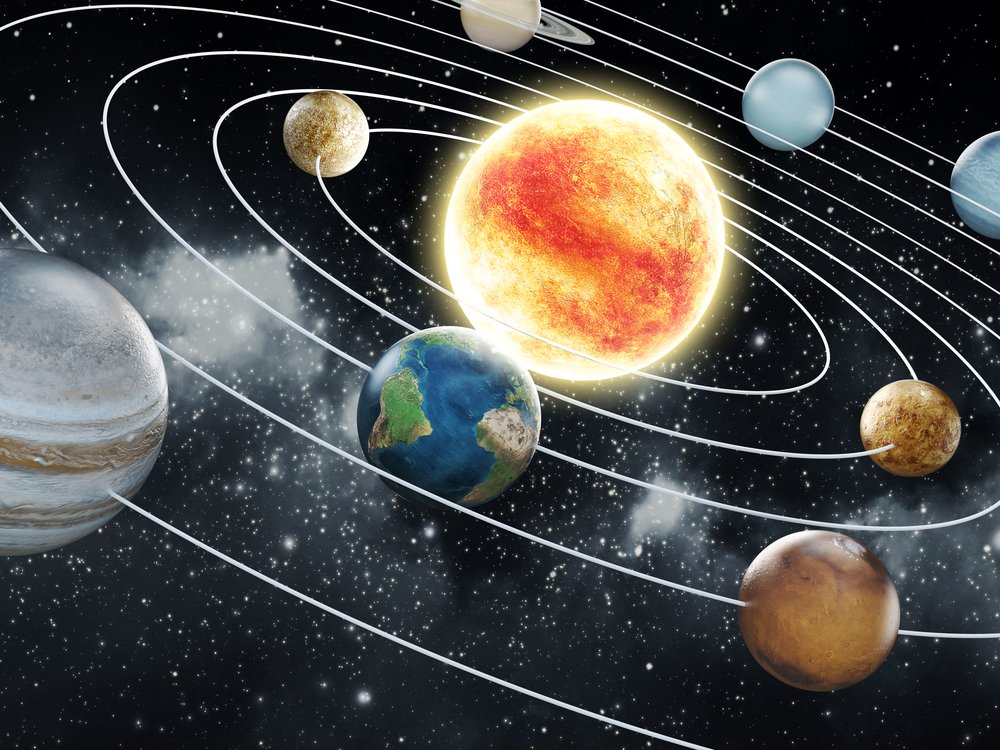
Task Description: This week Room 7 Literacy had to make a little rhyme that will help you remember the order of the 8 planets in the solar system. This week we are focusing on Pluto that used to be a planet but now scientists discovered that it was not a planet. So some people can say,"Well it's a planet in my heart"! Well you have to get used to Pluto not being a planet. Anyways I used google to help me find some words. Since Pluto ain't a planet anymore it was kind of hard finding the words but I managed and came up with My Very Educated Mother Just served us Nougat, and if you can see the first letter of each word has the first letters of each planet. For Example: My Very stand for Mercury and Venus. I then added a photo of the solar system without Pluto. I hope this helps you remember each planet in the solar system. Stay tuned for my next post
Subscribe to:
Posts (Atom)